How it works
- Open a saved filter in Jira search.
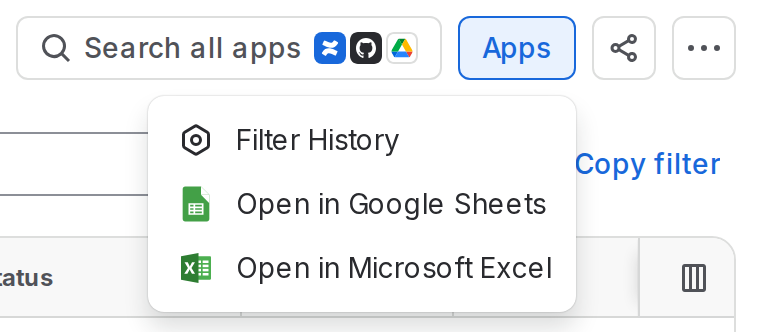
- View its history. Select Apps → Filter History from the filter’s page to open its history.
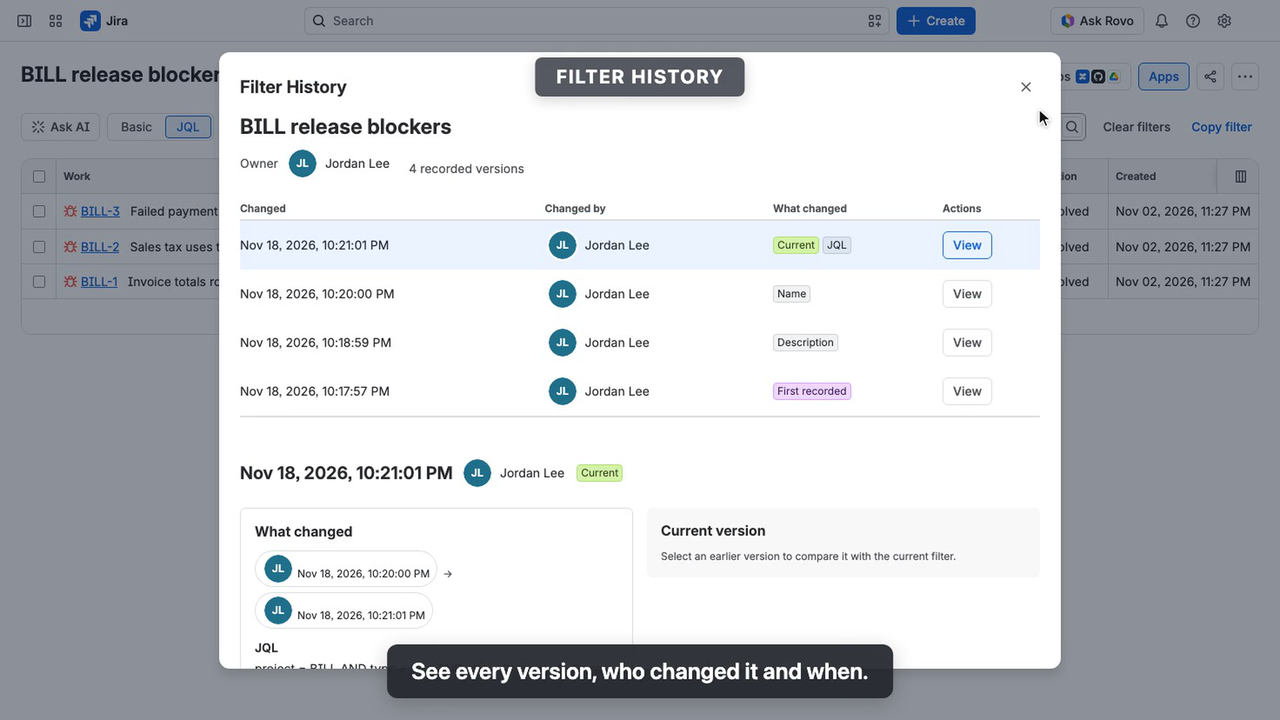
- Review versions. See who changed the filter, when, and which fields changed. Select View to inspect a version.
- Compare changes. What changed compares a version with its predecessor, while Compare with current filter shows differences from the current filter. Removed text is struck through; added text is bold.
- Restore a version. Select Restore version and confirm. The filter’s name, description and JQL are restored, while ownership, sharing and edit permissions remain unchanged.
Each restore creates a new history entry marked Restored. You can restore only filters you have permission to edit.
To browse histories across filters, go to Apps → Filter History. The page lists accessible filters with recorded changes, most recently changed first. Jira administrators see every filter, including private ones. Use Search filters to narrow the list or select a filter to view its history.
Deleted filters
Deleted filters with recorded history remain available to their last owner and Jira administrators under Deleted filters for 90 days. The list shows when each history is removed. Only the last owner can recreate a deleted filter.
To recover a filter, select a version, choose Recreate filter and confirm. The app creates a new private filter owned by you, with the selected version’s name, description and JQL. Its history moves to the new filter.
The recreated filter has a new ID, so boards, dashboards and subscriptions referencing the original aren’t updated. You can share the new filter in Jira.
Deleted filters can be recreated from Apps → Filter History, not from the Apps menu within Jira search.
Deleting history
Jira administrators can permanently delete filter histories without affecting the filters themselves.
Administrators can delete histories from the Deleted filters list or from any filter’s history on the Filter History page.
Deleting a history permanently removes all recorded versions for everyone. The filter remains unchanged, and its next change starts a new history. Anyone who can see the filter can see who deleted its earlier history and when.
Ask Rovo about a filter
Filter History includes a read-only Filter History for Jira Rovo agent. Open Rovo Chat and select the agent to ask questions about a filter’s 10 most recent recorded changes.
Use the numeric filter ID found after filter= in its Jira URL. For example:
- “What changed in filter 10042?”
- “Who last changed the JQL of filter 10042?”
The agent is available on Jira sites with Rovo enabled. It respects your Jira permissions and never modifies filters. To restore a previous version, go to Apps → Filter History.
Screenshots
Installation
A Jira Cloud organization or site administrator can install Filter History. Installation does not modify existing filters.
Configuration
No configuration required. Filter History automatically starts recording changes to all saved filters as soon as it’s installed.
Permissions & data
Requested scopes
read:jira-work— find accessible filters, read their names, descriptions and JQL, and check administrator permissions.write:jira-work— restore previous filter versions or recreate deleted filters as the current user.manage:jira-configuration— receive filter events to record changes and deletions.report:personal-data— report the stored account IDs to Atlassian each week, as its user privacy rules require, and learn which accounts were closed.storage:app— store filter histories and deletion records and, for Atlassian’s personal data report, the account IDs it stores and which filters hold each.
Access & permissions
Filter reads, restores and recreations respect Jira’s user permissions. Users can view histories only for filters they can access and restore versions only for filters they can edit.
Jira administrators can view the history of every filter, including private and deleted ones, as Jira lets them see all filters. They can restore only filters Jira lets them edit, and only a deleted filter’s last owner can recreate it. Only administrators can delete histories.
Data storage & retention
Filter History stores each version’s name, description, JQL, owner, and who changed it and when. Sharing settings and edit permissions are not recorded.
For deleted filters, it also records the last owner, who deleted the filter, and when. When an administrator deletes the history of a filter still in Jira, it records who deleted it and when; for a deleted filter, only the time of its delete is kept.
- Retention: Kept while the filter exists and the app is installed, with no time limit: the latest 100 versions per filter, and older versions are automatically removed.
- Deleted filters: Histories are removed from 90 days after deletion, unless the filter is recreated or an administrator deletes the history sooner.
- Size limits: Jira’s filter events leave out descriptions over 10,000 characters and JQL over 90,000 characters, so those descriptions cannot be recorded or restored, and changes to a filter with such JQL are not recorded.
- Closed accounts: Each week the app reports the account IDs it stores to Atlassian, keeping a list of them until Atlassian reports an account closed. When an account is closed, its ID is removed from every record, and from the list a week later: its changes show an unknown user, and a deleted filter it owned can then be viewed only by Jira administrators, and recreated by no one. Account IDs written into a filter’s JQL are part of the query and stay as written.
Privacy
The app stores its data in Atlassian Forge, declares no external network access and does not log filter content.
Uninstalling the app does not affect your filters. Atlassian retains Forge app data for 28 days after uninstall, but reinstalling does not automatically restore it.
When you ask the Rovo agent about a filter you can see, it receives the filter’s ID and name, its latest ten versions (when, who, what changed, and the name, description, JQL and owner after each change) and, if an administrator deleted earlier history, who did and when. Rovo requests and responses are processed under Atlassian’s Rovo data policies, potentially using third-party AI models. Rovo data processing and retention are separate from the app’s Forge storage.
Troubleshooting
- Filter not listed: Only accessible filters with recorded changes appear. Check the filter’s visibility in Jira. On a site with more than 1,000 filters with history, the page lists the most recently changed; open any other from Filter History in Jira’s search. Deleted filters covers the 1,000 most recently deleted filters.
- The app says there’s no active subscription: Filter History for Jira is a paid app, billed through Atlassian, and works fully during a free trial. Without a subscription, histories can’t be viewed, restored or recreated, and changes aren’t recorded. Recorded history stays as it is, and the weekly personal data report, closed-account removal and 90-day cleanup continue. Everything works again once the site subscribes in Atlassian Administration.
- “This filter is being updated”: Another change to the same filter’s history is being saved. Try again in a moment.
- An action says to try again to finish: A delete or a recreate was interrupted part-way. Select Delete history or Recreate filter again to complete it.
- Missing changes: Changes made before installation or while the app had no active subscription, and sharing and edit-permission changes, are not recorded. Saves without changes don’t appear as versions. Each filter keeps its latest 100 versions.
- Restore unavailable: You lack edit access, or the selected version matches the current filter. Request edit access from the owner if needed.
- Restore or recreate failed: Jira rejected the change, possibly due to invalid JQL or a duplicate filter name. Review the error, resolve the issue, or try another version. No changes were made.
- Change not confirmed: Check the filter in Jira before retrying. For recreations, wait one minute before retrying to avoid duplicates.
Support
For questions, bug reports, or feature requests, email support@srcplugins.com or open an issue on GitHub.