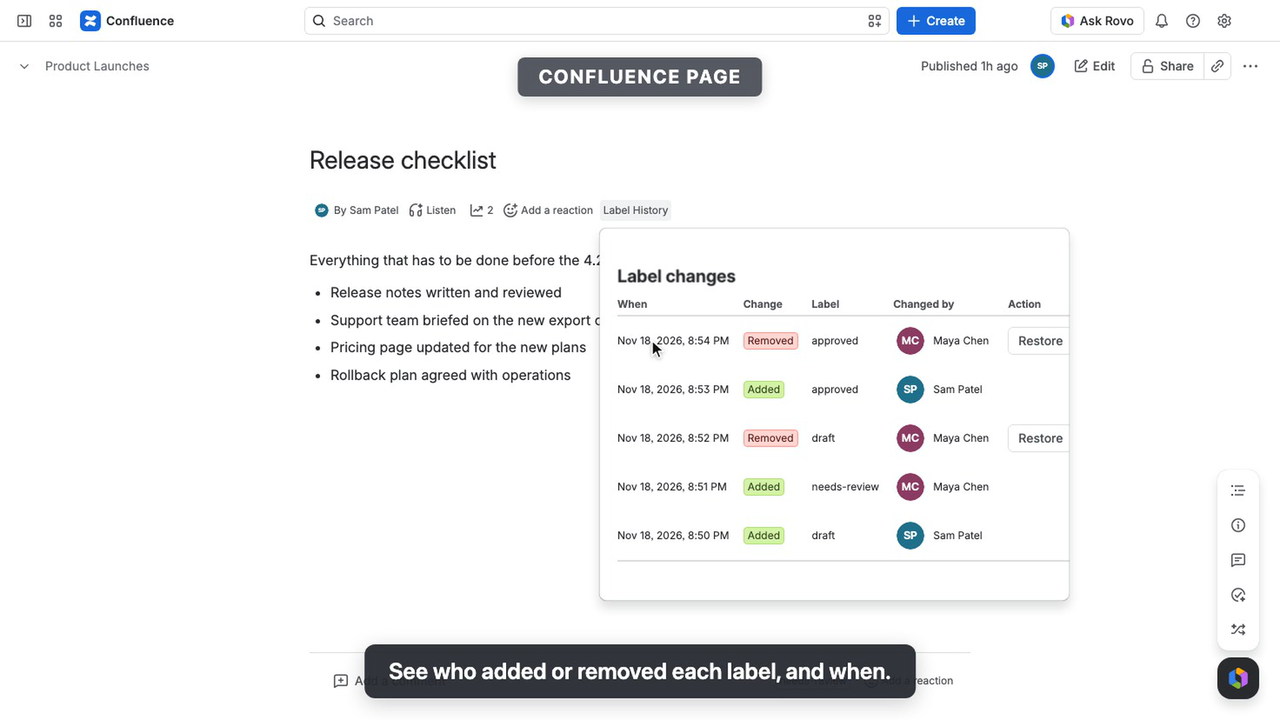
How it works
- Open a page in Confluence.
- View its history. Select Label History under the page’s title.
- Review changes. See labels Added or Removed, who changed them and when, newest first. Unknown means Confluence didn’t identify the account.
- Restore a removed label. Select Restore next to a removal and confirm. The label is added back as you, and the addition appears in the history under your name. Cancel leaves the page unchanged.
You can restore only a label whose latest recorded change is a removal, on a page you can edit. Archived pages keep their history but cannot be restored.
What’s recorded
Page labels in every space, personal spaces included. Blog posts, live docs, templates, space labels and personal (my:) or team (team:) labels aren’t recorded.
Changes on pages whose view restriction excludes the app aren’t recorded. Edit restrictions alone don’t affect recording.
Ask Rovo about label changes
Open Rovo Chat and select the read-only Label History for Confluence agent. Ask about up to 20 recent changes on a page you can view, one page at a time.
Use the page ID after /pages/ in the page’s address. For example: “Who changed the labels on page 123456?”
The agent requires Rovo on your Confluence site and never changes labels. To restore one, open the page’s Label History.
Screenshots
Installation
A Confluence Cloud organization or site administrator can install Label History. Installation does not modify existing pages, labels or spaces.
Configuration
No configuration required. Recording starts at installation; earlier changes aren’t available.
Permissions & data
Requested scopes
read:confluence-content.summary— receive label added and label removed events.read:confluence-space.summary— required by Confluence to deliver label events; the app doesn’t read or store the space.read:page:confluence— read page titles, check view and edit access, and check labels before restoring.report:personal-data— report the stored account IDs to Atlassian each week, as its user privacy rules require, and learn which accounts were closed.storage:app— store the recorded label changes.write:confluence-content— restore removed labels and receive page deletion events to remove their history.
Access & permissions
History reads and restores respect Confluence’s user permissions. You can view history only for pages you can access. Trashed and deleted pages show no history. The app reads each page as you, so it shows only what Confluence shows you. Recording runs from Confluence’s events, as the app.
Data storage & retention
Label History stores page IDs, the label’s ID and name, whether it was added or removed, when and the actor’s account ID, and for each account ID when the app first stored it. Page titles are read as you when needed; page content, other labels, display names and email addresses aren’t stored.
- Change limit: History shows the latest 100 changes per page. There’s no time limit: older changes are removed only as new ones are recorded.
- Moved pages: History moves with the page.
- Trashed and deleted pages: History stays hidden in the trash. Confluence’s page deletion event removes the history while the app is licensed; pages purged while it isn’t, and whole deleted spaces, may leave hidden records until uninstall.
- Closed accounts: Each week the app reports the account IDs it stores to Atlassian. Each recorded account ID is kept, and reported, until Atlassian reports the account closed or the app is uninstalled, even after the changes naming it are removed. Within about a week of Atlassian reporting a closure, its ID is removed and its changes show an unknown actor.
Privacy
History is stored in Atlassian Forge. The app declares no external network access, and its logs hold no page content, labels or identifiers.
Uninstalling leaves pages and labels unchanged. Forge retains app data for 28 days after uninstall, but reinstalling does not automatically restore it.
Rovo requests and responses are processed under Atlassian’s Rovo data policies, potentially using third-party AI models. Rovo processing and retention are separate from the app’s storage.
Troubleshooting
- Recent change missing: Reopen the history after a few seconds to allow recording to finish. Check the recording limits above.
- Restore unavailable: Check edit access, whether the page is archived and whether the label was added back.
- Restore refused: Follow the message: reopen the history if the label changed, check edit access if Confluence refused, or wait a minute if Confluence is busy.
- Restore not confirmed: Confluence didn’t confirm the change, after a lost connection or a Confluence error. The history updates if the label was added back; otherwise reopen it to check.
- Not recorded yet: Confluence confirmed the restore, but its change hadn’t been recorded about 20 seconds later. Reopen the history later to see it.
- History couldn’t load: Follow the message, then select Try again. If Confluence is busy, wait a minute first.
Support
For questions, bug reports, or feature requests, email support@srcplugins.com or open an issue on GitHub.